Asahi is one of the largest beer breweries in Japan, which also owns multiple global beer companies, including Pilsner Urquell, Peroni, and Grolsch. Last year, they were forced to revert to a paper pen mode of operation.
It was one of the largest breaches in 2025, exposing the data of 1.9 million people and causing significant disruptions in orders, shipments, and customer service. The company had updated backups in place, but still, they ended up paying the ransom. Why? Because backups alone aren’t enough against modern ransomware. While they do a good job at helping recover, they are ineffective at protecting the compliance, operations, recovery, and reputation.
Through our blog, we will see how ransomware has evolved, why cybercriminals target backups, and some effective ransomware protection best practices for 2026.
How ransomware works in 2026?
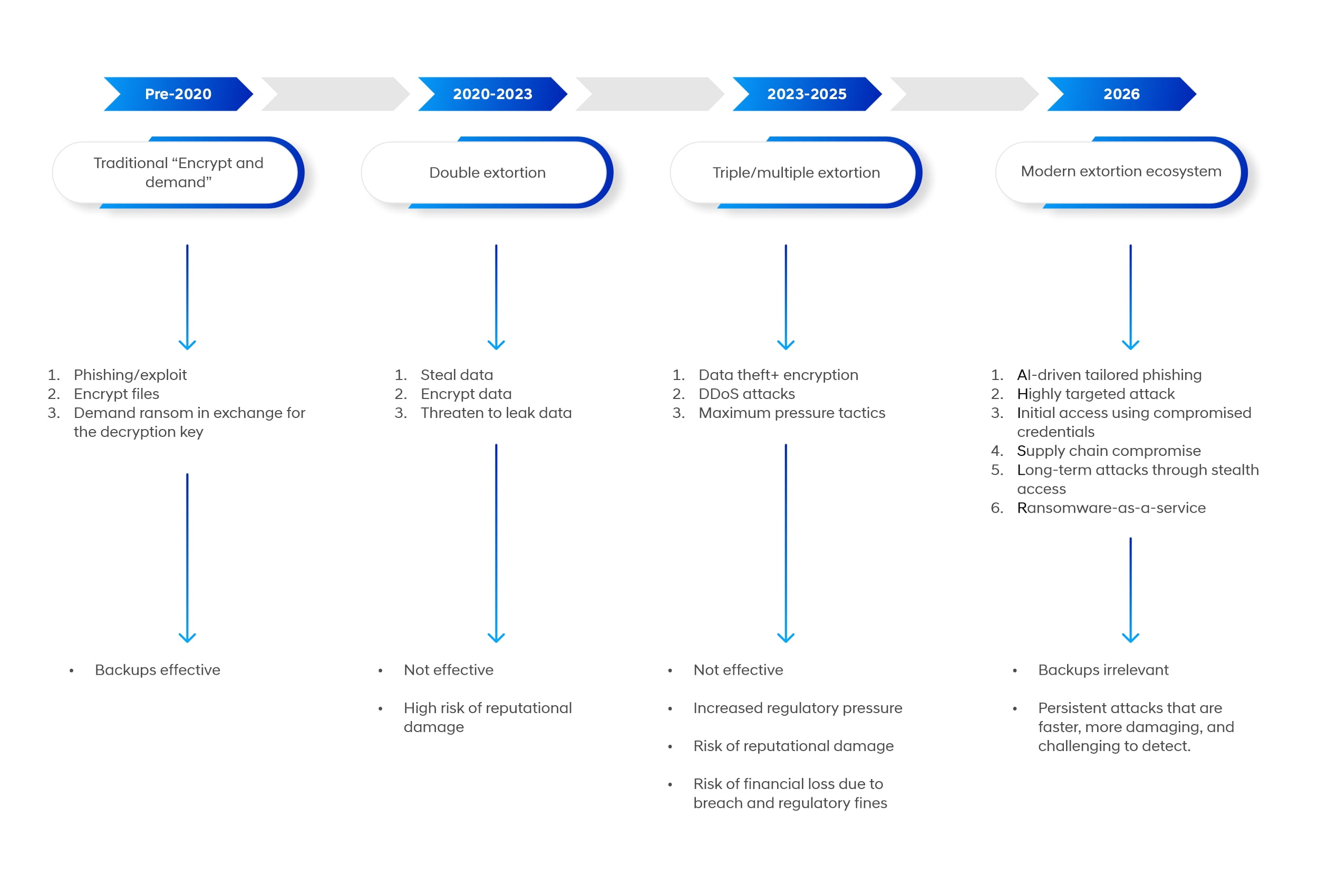
Ransomware attacks are no longer encryption-only attacks. They have evolved into double and triple extortion attacks where they also threaten to leak the sensitive information.
Attackers are already using AI in multiple ways to make threat campaigns effective, persistent, undetectable, and more damaging.
An MIT study found that AI was used to orchestrate 80% of cyber attacks in 2025. Attackers are using malicious tools like Fraud GPT and Worm GPT, which are sold on the dark web to create unique strains of malware, tailor more effective phishing lures, and offer steps to evade tight security measures.
Ransomware-as-a-service has become more fragmented than ever, making it easier to execute an attack. Attackers can rapidly shift between platforms, making it difficult to catch them. A 2025 Checkpoint study found that in Q3, there were more than 85 ransomware and extortion groups.
There has been a rise in AI-led reconnaissance campaigns where attackers use AI to conduct active and passive reconnaissance.
Last year, a group of professors and students created the world’s first fully automated ransomware – Promptlock. It proved how AI can be used effectively to orchestrate all the stages of a ransomware attack, from targeting multiple platforms, creating malicious payloads, to automatically self-improving through information gathering.
Why are attackers aiming for backups?
A common pattern in most modern ransomware attacks is that once they have gained initial access and escalated privileges, they prioritize hunting and destroying backups during dwell time (an average of <24 hours before encryption).
It is because by destroying their target’s backup, cloud-based information assets, and NAS devices, they can prevent them from recovering without paying the ransom.
One of India’s biggest motorcycle manufacturers, Royal Enfield, got hit by a ransomware attack last year, where the attacker published the session ID, QTox handle, and Telegram contact demanding ransom within 12 hours. The attacker removed all their backups and encrypted all their servers.
It increases their leverage and makes it more likely for their targets to pay ransom to regain access to their information. Compromised backups can lead to disastrous consequences for an organization. Apart from increasing the pressure on them to pay ransom, it makes it highly challenging for them to recover, not to mention an increased downtime, causing significant damage to customer trust.
Use air-gapped strategy for backups
Now you must be thinking that backups are ineffective against modern ransomware attacks. Here is where you should rethink. The real problem is about strategy, not about keeping backups. Most organizations make the mistake of keeping backups at internet-facing locations that can expose them to exfiltration risks. Organizations need to have a ransomware-resistant air-gapped backup that is physically or logically isolated from networks, making it inaccessible to hackers and malware. So, even if the main system is down, the backup remains intact, enabling quick recovery.
Your immutable air-gapped backup strategy must include:
Enforce the 3-2-1-1-0 rule for backups
Where ‘3’ represents three copies of data (one production + 2 backups) stored in 2 different media (could be disk, cloud/object storage), where 1 copy is stored offsite, 1 is air-gapped or stored offline, and ‘0’ represents continuous verification of the integrity of backups.
It ensures that the backups are complete, uncorrupted, and usable when needed.
To summarize: the 3-2-1-1-0 rule means:
- 3- copies of data
- 2 – different storage media
- 1 – copy stored offsite
- 1- copy air gapped
- 0 – errors in the verification of /backups
Create immutable storage
Immutability ensures that the backup data, once written, cannot be altered or deleted. Organizations can do this by enabling write-once protection for their data. They can also define the time window during which the data cannot be deleted, ensuring that even highly privileged accounts cannot bypass and delete the backup data before the retention period. A best practice is to create time-based retention policies or legal hold policies that prevent data from being modified or deleted for a specified period. Most modern cloud platforms, like Amazon S3 and Azure, offer immutability features.
For example, for Azure Blob Storage, immutability policies like time-based retention and legal holds can be configured. For Amazon S3, Object Lock and versioning can be enabled during bucket creation.
Keep separate backup admin credentials
Credential compromise is one of the primary causes of backup failures during ransomware incidents. They are critical because they reduce the risk of unauthorized access and data breaches. They also limit the potential damage that attackers can cause.
If an organization is using the same identity infrastructure or admin credentials as production systems, then attackers can use them to delete all the backups, disable backup jobs, and encrypt all the backup repositories. To prevent this from happening, you should use dedicated, isolated backup admin accounts, avoid domain-joined backup infrastructure where possible, enforce MFA and strict access controls, and store credentials in secure vaults with limited access. Doing so will create a separate layer for backups that attackers cannot access even after gaining full control.
Regularly test whether backups are working
Another common mistake is not testing whether their backups are working as they should. They discover too late that their backups are corrupted, their recovery is taking longer than it should, and their critical systems were never included in the backup scope.
It is why regular testing of restores is important. It helps validate backup integrity, measure recovery time objectives and recovery point objectives, and identify gaps in backup coverage, like any missing systems, configurations, and dependencies. You can schedule restore tests and test their effectiveness through simulation of real-world scenarios, and document and improve recovery runbooks.
Limit the blast radius of attack with Zero Trust
Modern ransomware threats intend to spread across an organization through initial access & privilege escalation and infect as much as possible.
Zero trust prevents the spreading through verification of every access request against identity, context, and device health before the request is granted, so the attacker couldn’t go very far even after gaining initial access.
It is based on three key principles – Never trust, always verify (real time evaluation of each access request, every time, throughout the session), Use least privilege (only give that much access which is minimum required for a specific task), and assume breach (build architecture assuming that attacker has already infiltrated), stopping attackers at their tracks and limiting what they can do with access.
It requires organization to microsegment the network, helping them reduce the blast radius of attack by ensuring that all the critical systems are isolated, access between zones is strictly controlled, and communication is only allowed when needed.
Just as you have to pass through security checks at the airport every time you take a flight, zero trust architecture verifies each request for access against identity, context, and device health. It requires organization to microsegment their network, much like watertight compartments of a ship that prevent flooding of the vessel due to flooding of one compartment. Traditional access controls allowed attackers to use legitimate credentials and laterally move across the network to infect systems. Zero trust eliminates that by isolating security zones and enabling least privileged access, so attackers couldn’t do much even with access.
The following are the zero-trust security controls that you should implement:
- Multi-Factor Authentication as an added verification layer
- Privileged Access Management for controlling and monitoring high-level access to critical systems.
- Credential security makes it difficult for attackers to leverage stolen credentials.
- Isolation of endpoints reduces the risk of infection spreading to other systems.
- Continuous monitoring of internal traffic helps detect unusual behavior and catch internal movements.
To summarize, here is how zero trust secures against modern ransomware threats
- Through microsegmentation, it blocks the movement of attackers between systems
- With least privilege, it limits what attackers can do with compromised accounts
- By continuously verifying, logging, and monitoring it flags and blocks suspicious access
- It prevents the misuse of credentials through strong identity controls
Prevent data exfiltration – the real threat
In 2026, the primary focus of attackers is ‘extortion’, not ‘encryption’. They have shifted from “encrypting the data” to “stealing and publishing”. It is also because they can leverage the stolen data for double or triple extortion. So, even if an organization effectively backs up data, it could still face regulatory fines, legal trouble, and reputational damage because, for regulatory bodies, data exposure is a reportable breach. Organizations are also required to report the data exfiltration within the required timeframe.
Therefore, having security mechanisms for preventing data exfiltration is as equally important as keeping backups. Modern-day defense needs organizations to prevent data from leaving organizations, rather than just ensuring quick recovery through backups.
GDPR mandates notification within 72 hours, HIPAA requires notifying affected people within 60 days, and PCI DSS requires notifying affected people within 24 hours.
To prevent data exfiltration, implementing these key controls should be your top priority:
Data Loss Prevention (DLP)
DLP is essential to monitor and control how sensitive data is accessed, shared, or transferred. It detects unusual movement of files, blocks unauthorized upload/transfer, and applies policies based on the sensitivity of data.
Outbound Traffic Monitoring
These controls help you track whether any data is leaving your network by triggering on large/unusual data transfer, transfer to unknown destinations outside, or unusual spikes in traffic. It helps you detect data exfiltration attempts in real time.
These controls help detect warning signs like any patterns pointing towards bulk data access, staging/compression of large data sets, DNS tunneling/covert channels, unusual database queries/exports that can help stop an attack early before turning into a breach.
Detect it before the ransomware encrypts data
Modern ransomware attackers are almost immune to signature-based antivirus systems. They use fileless techniques, legitimate living-off-the-land tools, and ransomware variants that have not appeared before. Therefore, quick detection and response that moves beyond signature-based detection is a must. It is where EDR/XDR comes into play. It focuses on detecting suspicious behavior, helping quickly spot common ransomware indicators like:
- Disabling of security tools
- Access to files during odd hours for modification/deletion
- Escalation of privileges that is not authorized
- Unusual file renaming/encryption patterns
- Signs of lateral movement across the network
Modern attackers can remain present in the network for weeks and months without getting detected. EDR helps prevent that by offering instantaneous detection with automated flagging and alerting in case of suspicious activity and response actions to quickly isolate the affected systems. Integration of automated tools like SOAR (Security Orchestration Automation and Response) can help turn detection into instant containment from just visibility by helping:
- Isolate infected endpoints
- Disable compromised accounts
- Block malicious processes and
- Trigger incident response workflows
Harden the human firewall
Nearly 60% of data breaches involve human error (Verizon, DBIR 2026) 68% of incidents are caused primarily due to human error (Mimecast, State of Human Risk 2025)
You can have the best security stack securing your infrastructure and still get breached just because someone from your company clicked on a malicious link.
Modern attackers are not trying to break in by running highly complex exploits, they are using already compromised credentials to walk in through the entrance. They target vulnerable humans through phishing and social engineering to steal credentials and gain access to their system/accounts.
Recently, threat researchers from Sophos discovered NICKEL ALLEY, a North Korean threat group, using fake LinkedIn pages to target vulnerable job seekers for delivering malware.
The group conducts fake interviews of candidates who apply to their fake LinkedIn page. Next, the candidates are asked to undergo a fake skills assessment, which leads them to an error page that was intentionally created. The candidates are instructed to enter commands to fix the error, which actually triggers the deployment of malware, which is a remote access trojan that can be used for various malicious purposes, primarily supply chain attack/corporate espionage. This is called a ClickFix tactic. Modern attackers use such tactics to steal credentials and deploy malware like infostealer. Other common tactics include the creation of fake login pages, Business Email Compromise attacks, and AI-driven phishing campaigns with tailored tone and style of communication that resemble genuine emails.
What should organizations do:
Create a security-aware workforce that can:
- Quickly recognize phishing attempts.
- Verify unusual requests.
- Handle sensitive data with caution.
- Report phishing and cybersecurity incidents.
Run phishing simulations to:
- Test employee readiness.
- Identify high-risk users.
- Train employees with real-world scenarios.
Take measures for the detection of malicious, negligent, and compromised insiders.
- Use UEBA to analyze and monitor user behavior within regulatory privacy bounds.
- Use Data Loss Prevention tools to monitor and detect unusual patterns (like data deletion and signs of alteration of files).
- Implement a whistleblower program where people can anonymously report suspicious activities.
- Create a detailed insider response management plan.
Combine a human firewall with technical controls.
- Where aware and trained users quickly spot & report, and defense systems quickly detect and respond to threats.