Microsoft’s Quick Assist feature exploited by attackers in ransomware attacks
18 Aug 2026
Security researchers have observed multiple threat actors increasingly abusing the Windows Quick Assist feature for IT support impersonation and social engineering attacks.
Through this blog, we will understand what the threats are about and what organizations can do to defend against them.
About the vulnerabilities
|
Name |
Threat type |
Threat actors |
Disclosure date |
|
Windows Quick Assist Abuse/ IT support impersonation |
Social engineering/vishing/remote access abuse |
Multiple financially motivated threat actors, including Storm-1811
|
Microsoft reported widespread abuse since April 2024. |
Potential impact of the threats
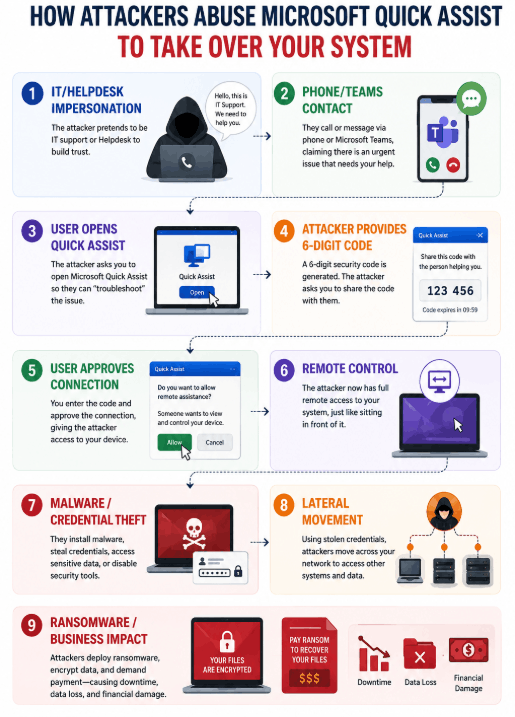
Attackers impersonate internal IT/helpdesk personnel or Microsoft support and reach employees through call, email, Microsoft Teams, or a combination of methods. They ask the victims to open Quick Assist and enter a six-digit security code provided by them and approve the session.
Once access is granted, they can view the victim’s screen and request control of the device. Microsoft has observed that the technique is followed by installation of remote access tools, deployment of malware/ransomware, lateral movement, and credential theft.
A successful abuse of Quick Assist can allow attackers to:
- Gain unauthorized remote access to corporate endpoints
- Steal sensitive information and credentials
- Install malware and remote access tools
- Establish persistence mechanisms
- Laterally move across the network
- Cause a compromise of privileged accounts
A typical chain followed by attackers
Notable threat behaviors
Security teams should monitor for:
- Unexpected Quick Assist execution or remote sessions
- Quick Assist activity followed by suspicious command execution
- curl.exe or bitsadmin.exe downloading files after a Quick Assist session
- Unexpected installation or execution of RMM tools such as ScreenConnect or NetSupport Manager
- Suspicious PowerShell or command-line activity
- Credential theft or phishing activity following remote access
- PsExec or other lateral-movement activity
- Unusual administrative activity following a Quick Assist session
- Attempts to deploy ransomware or encrypt files
Official security guidance
Microsoft recommends reducing the attack surface by blocking or uninstalling Quick Assist when it is not required for legitimate business purposes. Microsoft also recommends educating users about technical-support scams.
Organizations should:
- Block Quick Assist if it is not required.
- Remove Quick Assist from managed endpoints where appropriate.
- Restrict installation and execution through application-control policies.
- Use an approved and controlled remote-support solution for IT assistance.
- Educate users to independently verify unexpected IT/helpdesk requests.
- Review Microsoft Teams external communication settings where appropriate.
- For organizations that require remote assistance, Microsoft Intune Remote Help can provide a more controlled support mechanism.
SharkStriker’s recommendations
- Block or remove Quick Assist on endpoints where it is not required for legitimate business operations.
- Restrict unauthorized remote-support applications using application-control/EDR policies.
- Monitor for Quick Assist followed by suspicious command execution, downloads, or RMM-tool installation.
- Strengthen user awareness: employees should never provide a Quick Assist code or approve a remote session they did not initiate.
- Investigate immediately if an employee unexpectedly grants remote access and consider the endpoint potentially compromised.
- User Awareness
Employees should remember:
- Never share a Quick Assist security code with an unexpected caller.
- Never approve a remote session that you did not initiate.
- Do not trust unexpected Teams messages or calls claiming to be IT support.
- Verify IT personnel through your organization’s official contact channels.
- If you unexpectedly provided remote access, disconnect the session immediately and contact the IT/SOC team.
Quick Assist is a legitimate Microsoft application and may be required for genuine IT support activities. Organizations should therefore apply the above controls based on their business requirements. If Quick Assist is not used for legitimate IT support, SharkStriker strongly recommends blocking or restricting its use.
Organizations already using approved remote-support solutions should consider disabling unnecessary remote-assistance tools to reduce opportunities for social-engineering-based initial access.
SharkStriker’s actions
- Threat intelligence research and validation completed.
- Recent Quick Assist abuse campaigns reviewed.
- Customer impact and exposure considerations assessed.
- Detection opportunities reviewed for Quick Assist and associated post-exploitation activity.
- Advisory prepared for affected customers.