NPM packages with over 2 billion downloads got compromised
10 Sep 2025
Imagine receiving a package from FedEx that is altered by criminals to snoop over your conversations and record secret codes to your safe without you even noticing? Now imagine this happening on a wider scale, affecting over a billion people.
Something similar has occurred with NPM or NodeJS Package Manager. Let us dive straight into it.
What is NPM?
NPM or Node.js Package Manager is the world’s largest software registry with millions of packages. It helps developers globally manage and share code packages that can be installed and used in projects. It acts as a useful repository for developers.
It is like an Amazon fulfilment center offering the required space and functions to sellers (maintainers) and customers (developers).
What if someone maliciously alters the packages that sellers have intended for customers? This is exactly what has happened with NPM.
What happened?
When hackers injected malware into NPM packages, new malicious versions of the packages started appearing with obfuscated code. These packages had over 2.6 billion downloads every week.
Cybersecurity experts from Aikido’s threat intelligence team discovered on 8th September 2025, 13:16 UTC, that malicious code was pushed to NPM packages that were widely in use.
How were the packages compromised?
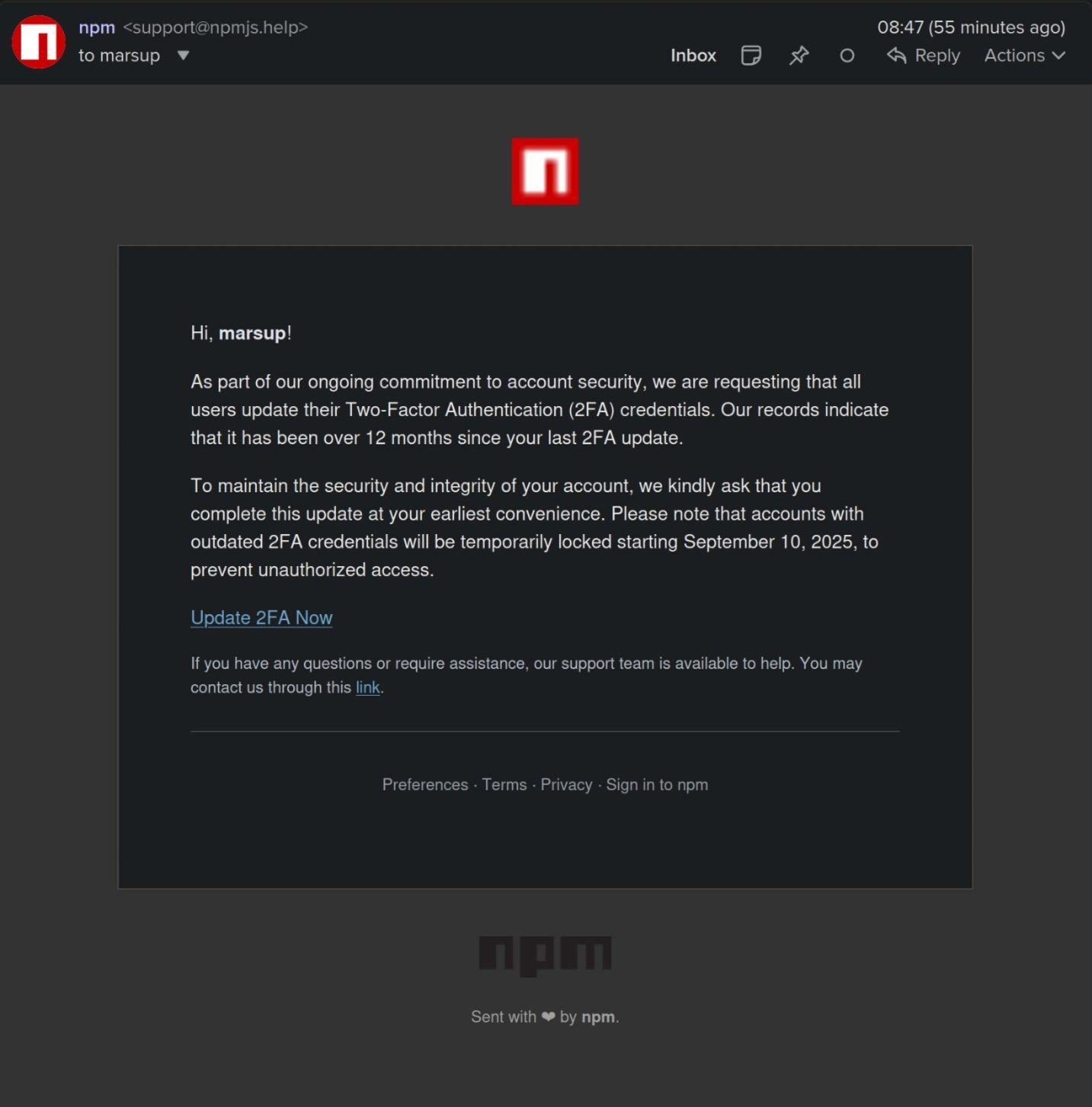
The attackers targeted maintainers of the packages through phishing, pretending to be from NPM, asking them to update their 2FA credentials with a malicious link.
Experts found out that it was a phishing email by identifying that the domain used was newly created (the phishing domain – npmjs.help) (address – support [at] npmjs [dot] help).
When the maintainers came to know that their packages had been compromised, they removed the compromised packages from NPM. The attackers targeted other maintainers of packages through a similar method upon noticing the removed packages.
About the malware
- It is a browser-based interceptor that hijacks network traffic and APIs.
- It can enable attackers to fully hijack sensitive identifiers like payment destinations or approval targets before the user notices. Meaning – they can redirect users to another malicious site in the background while their payment is in progress.
- It operates in multiple layers.
- It can alter website content, tamper with API calls, and manipulate user applications to make them believe that they are signing in.
How it works?
- Injects into the browser.
- Looks for sensitive data among network responses and transaction payloads (like wallet addresses and cryptocurrencies).
- Redirects users to an attacker-controlled address with a legit-looking UI.
- Maintains stealthy persistence until a viable opportunity.
- Attackers alter transactions, steal money, and information.
The affected packages
- backslash (0.26m downloads per week)
- chalk-template (3.9m downloads per week)
- supports-hyperlinks (19.2m downloads per week)
- has-ansi (12.1m downloads per week)
- simple-swizzle (26.26m downloads per week)
- color-string (27.48m downloads per week)
- error-ex (47.17m downloads per week)
- color-name (191.71m downloads per week)
- is-arrayish (73.8m downloads per week)
- slice-ansi (59.8m downloads per week)
- color-convert (193.5m downloads per week)
- wrap-ansi (197.99m downloads per week)
- ansi-regex (243.64m downloads per week)
- supports-color (287.1m downloads per week)
- strip-ansi (261.17m downloads per week)
- chalk (299.99m downloads per week)
- debug (357.6m downloads per week)
- ansi-styles (371.41m downloads per week)s
The affected versions
- backslash – 0.21
- chalk-template – 1.1.1
- supports – hyperlinks – 4.1.1
- has.ansi – 6.0.1.
- simple-swizzle – 0.2.3
- color-string 2.1.1
- error-ex 1.3.3
- color-name 2.0.1
- is-arrayish 0.3.3
- slice-ansi 7.1.1
- color-convert 3.1.1
- wrap-ansi 9.0.1
- ansi-regex 6.2.1
- supports-color 10.2.1
- strip-ansi 7.1.1
- chalk 5.6.1
- debug 4.4.2
- ansi-styles 6.2.2
Recommendations
- Use NPM audit command to perform vulnerability scan across project dependencies. It also offers recommendations for treatment of vulnerabilities.
- Check the version of the packages in use against the list of compromised packages
- Clear all the NPM cache
- Reinstall packages in the repository
- Use only package lock file with pinned version