319 malicious Chrome extensions hijack searches of 13.4 million users
30 Oct 2026
TL:DR
Security researchers have identified malicious browser extensions in Google Chrome with ~13.4 million downloads being used by attackers to redirect users to operator-controlled servers.
Overview
What if a legitimate Chrome extension you installed was intentionally placed by an attacker to redirect you somewhere you didn’t intend to go?
On 29th October, Socket reported on a Chrome extension search hijack campaign in which attackers used extensions disguised as legitimate utilities like PDF converters, manual finders, safe-search tools, and AI search assistants to target users.
Through our blog, we will understand what the extension search hijack campaign was about, the threat it poses, and what organizations can do to defend.
About the threat
|
Threat name |
Type |
Browser targeted |
Delivery method |
Date reported |
Prerequisites |
|
Chrome extension search-hijacking campaign |
Extension-based search hijacking |
Chrome |
Via pop-up and pop-under promotions |
29 October, 2026 |
No extensive permissions or complex executable code needed to redirect browser searches |
The extensions exploit Chrome’s built-in “chrome_settings_overrides” function to replace the browser’s default search provider. Some of the extensions examined by researchers contained more than a manifest file and icons, but no background scripts or additional permissions.
How it works
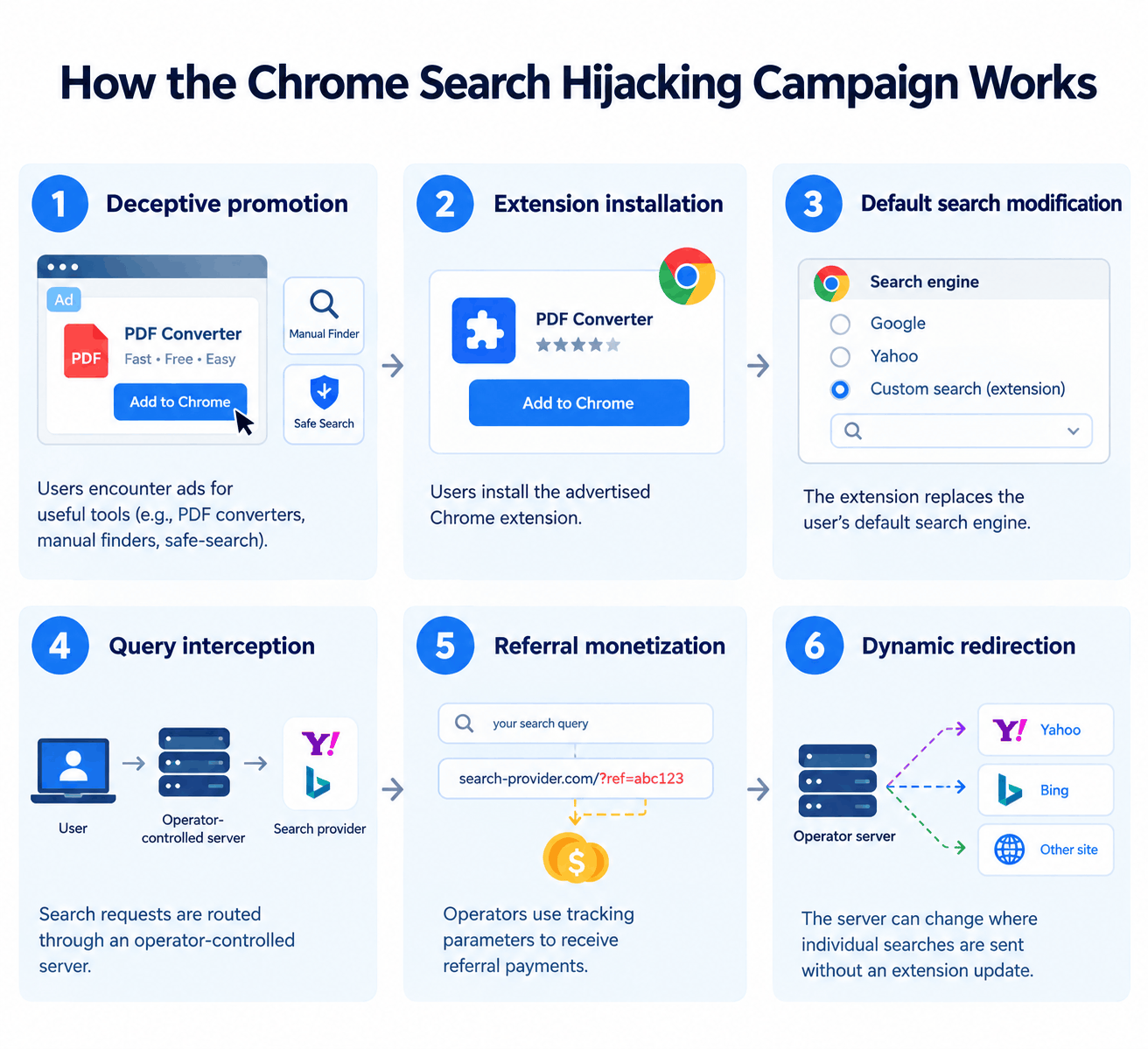
Potential risks include
- Search-query exposure: Operators controlling the proxy can observe search requests passing through their infrastructure.
- Privacy concerns: Search queries may reveal personal interests, business activities, or other sensitive information.
- Untrusted search destinations: Users may be directed through unfamiliar domains instead of reaching their intended search provider directly.
- Potential phishing exposure: Operators could potentially change routing behavior to direct selected users to phishing pages or fraudulent websites. This was identified as a potential risk, not a confirmed campaign outcome.
- Reduced visibility during extension reviews: Extensions that request few permissions may appear less suspicious during basic security checks.
- Enterprise security concerns: Unauthorized extensions can change browser behavior and introduce external dependencies that are difficult to identify without centralized browser management.
The actual impact depends on the installed extension, its configured endpoints, and the behavior of the infrastructure receiving search requests.
Affected Extensions and Mitigation
Affected products: ** The investigation concerns 319 Chrome extensions identified by Socket. The complete list of extension names and identifiers is available in its Searchjacked research report.
Affected users: The extensions accumulated approximately 13.4 million reported installs across the period studied. This does not mean that all installations remain active.
Immediate mitigation: Check installed extensions against the list published by Socket and remove confirmed matches.
Browser configuration: Verify that Chrome’s default search provider has not been changed unexpectedly.
Enterprise controls: Restrict extension installation through managed browser policies and an approved-extension allowlist where appropriate.
Additional checks: Run an endpoint security scan when an extension is identified as suspicious, particularly if other unusual browser or system behaviour is present.
SharkStriker’s recommendations
- Audit browser extensions: Review installed Chrome extensions across managed endpoints and compare them against the extension list published by Socket.
- Enforce extension allowlisting: Permit only approved extensions where operationally feasible, and restrict installation from untrusted sources.
- Validate browser settings: Monitor changes to default search engines and investigate unexplained modifications.
- Strengthen endpoint monitoring: Correlate browser configuration changes, extension installations, and unusual outbound connections.
- Educate users: Advise employees to avoid installing browser extensions promoted through unexpected advertisements or from unfamiliar publishers.
- Investigate suspicious activity: If a listed extension is discovered, assess its installation history, search redirections, and associated network connections.
- Maintain ongoing reviews: Reassess browser-extension inventories periodically because removing known extensions does not prevent unrelated or newly published extensions from appearing.