Attackers exfiltrate data and hijack Microsoft cloud accounts using passkey phishing
14 Sep 2026
Microsoft recently tracked and disclosed active threat campaigns in which hackers use passkey-, MFA-, and SSO-themed social engineering to compromise Microsoft cloud identities, gain access, and exfiltrate organizational data.
Through the blog, we will understand what the passkey-phishing-based campaign targeting Microsoft cloud accounts is about, how they threaten organizations, and what organizations can do to defend against it.
About the vulnerabilities
|
Threat name |
Type |
Affected Products |
Severity |
Primary target |
|
Passkey-Themed Social Engineering / Cloud Identity Compromise
|
Phishing
|
|
High / Critical Identity Security Risk
|
Enterprise users and Microsoft cloud identities |
How it happens?
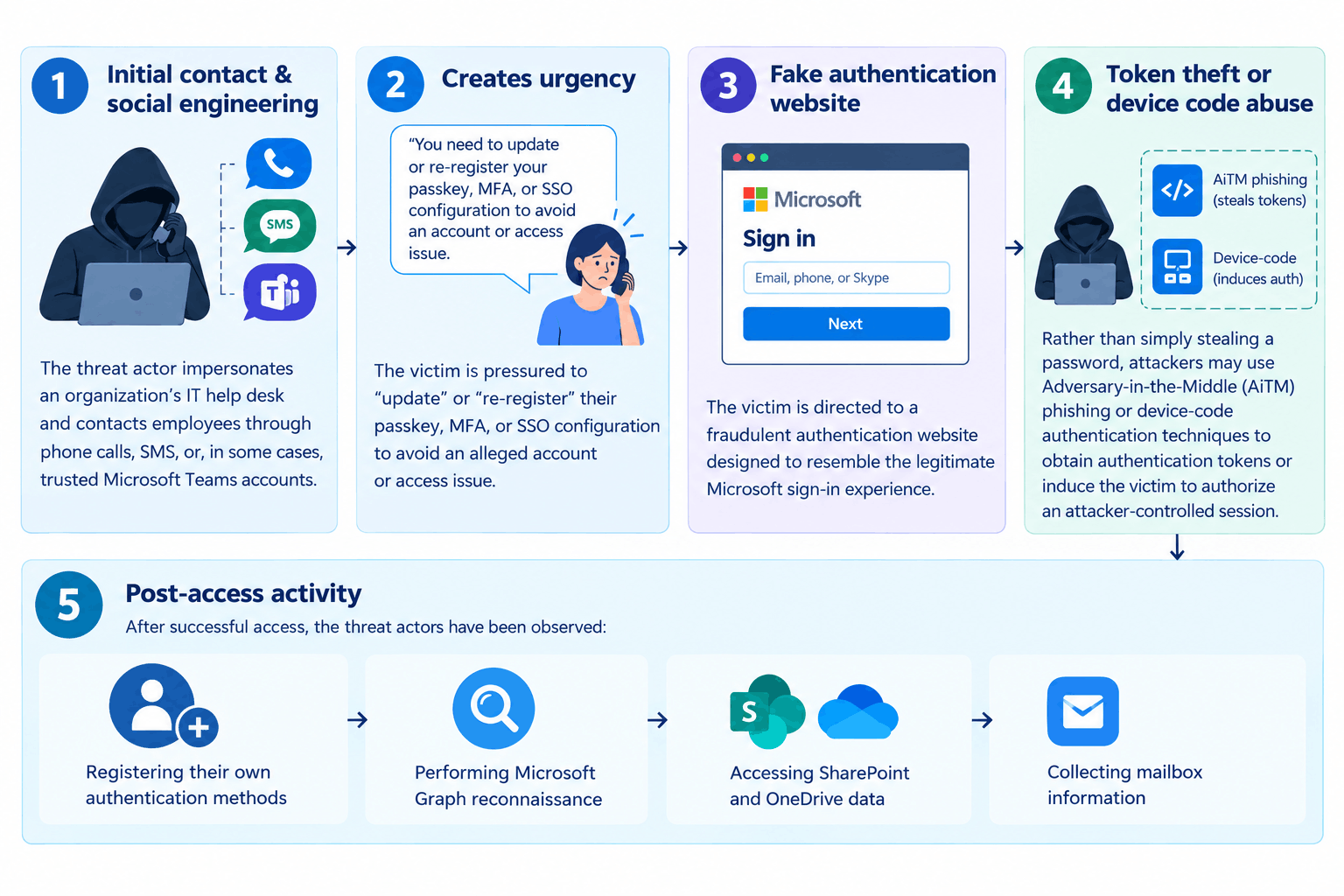
Initial contact
The threat actor poses as a Microsoft help desk and contacts employees through phone calls, SMS, or even trusted Microsoft Teams accounts.
Urgency for action
The victim is pressured to ‘update’ or ‘re-register’ their passkey, MFA, or SSO configuration to avoid a critical account-related issue.
Fake authentication website
Next, the victim is directed to a malicious website that looks like a legitimate Microsoft sign-in page.
Token theft or device code abuse
Instead of simply stealing a password, attackers use Adversary-in-the-Middle phishing or device-code authentication techniques to obtain authentication tokens or authorize an attacker-controlled session.
Post-access activity
After successfully gaining access, attackers may register their own authentication method, perform Microsoft Graph reconnaissance, access SharePoint and OneDrive data, or collect mailbox information.
What can attackers do?
Attackers can:
- Bypass or undermine traditional MFA protections through stolen sessions or attacker-controlled authentication methods
- Establish persistent access to compromised Microsoft cloud identities
- Enumerate users, groups, roles, permissions, and enterprise applications
- Identify privileged and high-value accounts
- Access sensitive SharePoint and OneDrive documents
- Search and collect corporate email and attachments
- Access internal organizational information through Microsoft Graph
- Conduct sustained cloud-data collection
- Potentially exfiltrate sensitive business information
- Use compromised accounts to conduct further phishing or social-engineering activity
- Support subsequent extortion or broader intrusion activity
Attack infrastructure
Threat actors have been observed registering domains designed around authentication and identity themes, including:
Passkey-Themed Domains:
passkeyhelpdesk[.]com
secure-passkey[.]com
setupmypasskey[.]com
add-pass-key[.]com
SSO / Identity-Themed Domains:
integratedsso[.]com
oktasession[.]com
Key Synchronization / Setup Themes:
syncmykey[.]com
keysyncos[.]com
oskeysync[.]com
oskeysetup[.]com
oskeyregister[.]com
syncmykey[.]com
myconnectkey[.]com
oskeyconnect[.]com
Setup / Verification Themes:
validationsetupac[.]com
portalsetuphub[.]com
Note: Threat actors can rapidly rotate domains and infrastructure. The above indicators should therefore be treated as detection opportunities rather than an exhaustive list of malicious infrastructure.
After gaining access to an account, threat actors have been observed performing the following activities:
1. Authentication Method Registration
Attackers register their own:
Phone numbers
Authenticator applications
Software-based OTP methods
This provides an attacker-controlled authentication factor that can support continued access.
2. Microsoft Graph Reconnaissance
Threat actors use Microsoft Graph to enumerate:
Users
Groups
Directory roles
Permissions
Applications
Enterprise resources
High-value identities
3. SharePoint and OneDrive Collection
Attackers perform large-scale file enumeration and downloading activities against:
SharePoint Online
OneDrive for Business
4. Exchange Online Collection
In some cases, attackers access mailbox information through REST API-based activity, including:
Mail messages
Folders
Attachments
Email metadata
5. Sustained Data Collection
Unlike a rapid “smash-and-grab” attack, observed activity may continue for hours or multiple days, allowing attackers to gradually collect sensitive information.
Official security guidance
Organizations should:
- Review newly registered authentication methods for users showing unusual or risky sign-in activity.
- Remove unauthorized authentication methods after validating the legitimate user.
- Enforce Conditional Access controls for security-information registration.
- Require phishing-resistant MFA where possible.
- Apply risk-based Conditional Access policies for risky users and sign-ins.
- Block device-code authentication flows unless there is a legitimate business requirement.
- Restrict user consent for applications and require administrative approval where appropriate.
- Regularly review applications and service principals with high-privilege Microsoft Graph permissions.
- Restrict access from unmanaged devices where appropriate.
- Enable Microsoft Graph activity logging and mailbox auditing.
- Monitor anomalous authentication-method registration and high-volume cloud-data access.
- Train employees to recognize help-desk impersonation and passkey/MFA-themed phishing.
- Establish a verified communication channel for legitimate IT support and MFA-related requests.
SharkStriker’s Recommendations
- Review all Microsoft Entra ID authentication-method registrations for unexpected changes.
- Investigate users who recently added a new phone number, authenticator application, or OTP method.
- Review risky and anomalous sign-ins, particularly from unmanaged devices and unusual locations.
- Monitor device-code authentication activity and investigate unexpected usage.
- Monitor Microsoft Graph activity for unusual enumeration of users, groups, roles, and
- applications.
- Monitor SharePoint and OneDrive for abnormal file access and download volumes.
- Review Exchange Online audit logs for unusual mailbox and attachment access.
- Implement phishing-resistant MFA for privileged and high-value users.
- Restrict authentication-method registration using Conditional Access.
- Disable or restrict device-code authentication where operationally feasible.
- Educate employees that legitimate IT teams should not unexpectedly request MFA/passkey enrollment through unsolicited phone calls or SMS.
- Establish a formal verification process for help-desk authentication and MFA requests.
- Block or monitor known malicious passkey/SSO-themed domains.