FortiBleed Campaign remains active: 86,644 stolen credentials exploited
09 Oct 2026
On 6th October, the FBI and the Secret Service warned that the FortiBleed campaign is still active and an active threat targeting FortiGate firewalls and secure socket layer (SSL) virtual private network (VPN)gateways.
In this blog, we look at what the FortiBleed campaign is about, how it impacts organizations, and what organizations can do to defend against it.
About the vulnerability
|
Threat name |
Threat type |
Date identified /Discovery date |
Vendor/Component affected + |
Targeted products |
About |
|
FortiBleed |
Credential Theft, Credential Stuffing, Password Spraying, Unauthorized Administrative Access and Persistence |
7 October 2026/8 October 2026 |
Fortinet FortiGate Firewalls and SSL VPN Gateways
|
|
The campaign involves reusing the previously compromised credentials, credential stuffing, and password spraying attacks on exposed Fortinet devices. |
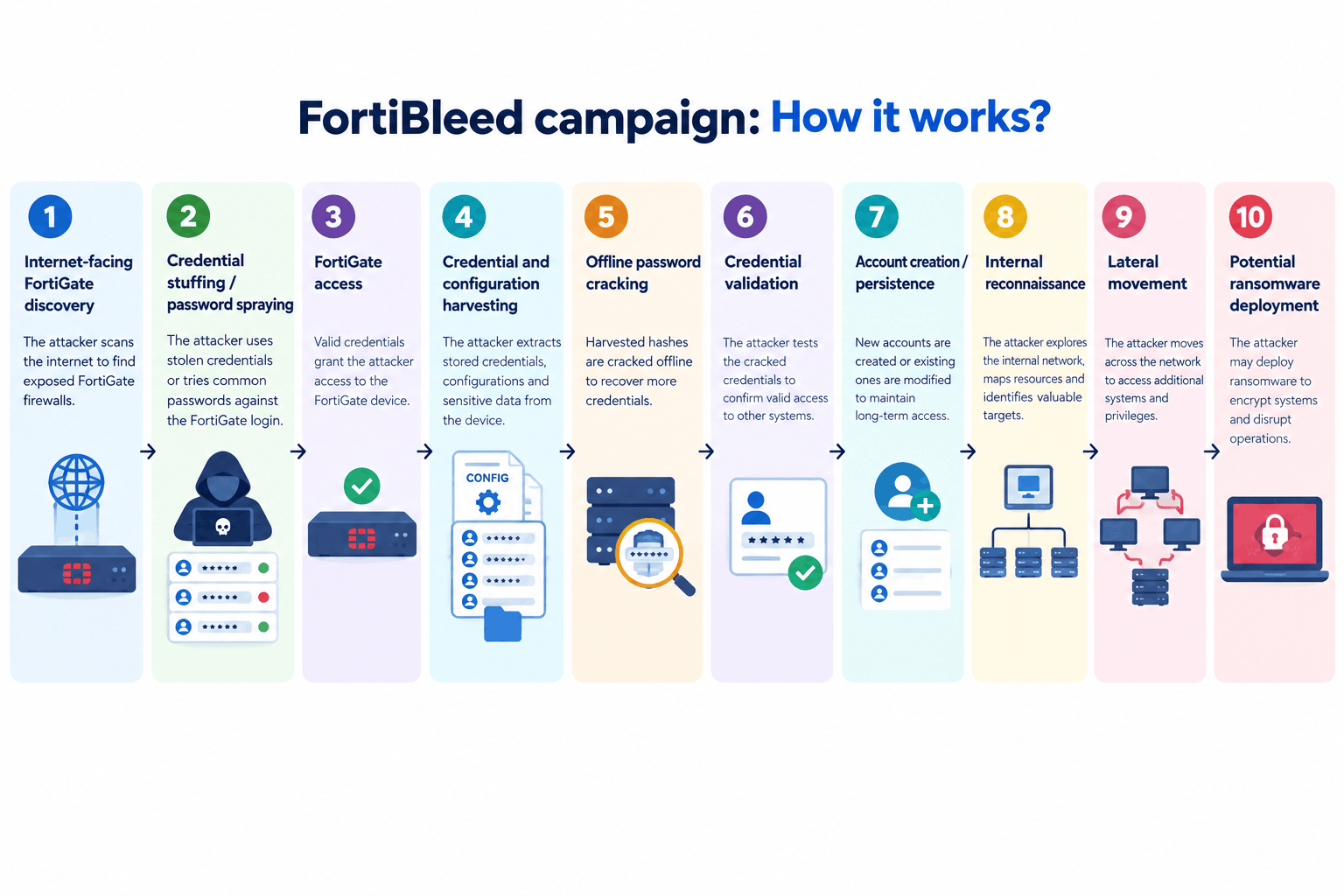
Security researchers have observed that attackers have created new administrative accounts on compromised devices and changed/deleted existing accounts to maintain persistence and prevent legitimate administrators from regaining access.
How does the FortiBleed campaign impact organizations?
A successful compromise of a FortiGate appliance may allow threat actors to:
- Obtain or abuse administrative and VPN credentials.
- Access internet-facing FortiGate management interfaces.
- Create unauthorized administrative accounts for persistence.
- Modify or delete existing accounts and potentially lock legitimate administrators out.
- Establish VPN access into the internal environment.
- Perform internal reconnaissance and Active Directory enumeration.
- Conduct additional password spraying against privileged accounts.
- Access internal network resources through compromised VPN credentials.
- Facilitate lateral movement within the organization.
- Potentially provide initial access to ransomware operators and other downstream threat actors.
- The current campaign has reportedly been associated with ransomware activity, including access linked to INC/Lynx and Payload ransomware ecosystems.
Official guidance
Fortinet recommends organizations with potentially impacted FortiGate appliances immediately:
- Terminate all active administrative and VPN sessions.
- Reset FortiGate administrative and VPN credentials, particularly credentials used on internet-facing appliances.
- Enable MFA for all administrator and VPN accounts, preferably using phishing-resistant authentication where supported.
- Upgrade FortiOS to current supported releases, including supported 7.4, 7.6, or 8.0 releases.
- Enable PBKDF2-based administrator credential protection and remove legacy weaker password settings where applicable.
- Review firewall and VPN configuration against a known-good baseline.
- Audit all local, administrative, and API accounts for unauthorized additions or modifications.
- Review FortiGate and authentication logs for unexpected administrator access, VPN connections, and suspicious source IP addresses.
- Restrict management access using trusted hosts or local-in policies.
- Where possible, remove direct internet exposure of FortiGate administrative interfaces.
- If unauthorized configuration changes or other indicators of compromise are identified, the appliance should be treated as potentially compromised and the organization’s incident-response and recovery procedures should be initiated.
SharkStriker’s recommendations
SharkStriker recommends that organizations do not rely solely on patching to address this campaign, as the primary concern is potential credential exposure and persistence on the FortiGate appliance.
We recommend the following immediate checks:
- Identify all internet-facing FortiGate appliances within the environment.
- Confirm that MFA is enabled for all administrator and VPN accounts.
- Perform an immediate credential rotation for FortiGate administrators and VPN users where exposure cannot be ruled out.
- Review the FortiGate configuration for new, unknown, or modified administrative accounts.
- Compare the current configuration against a known-good configuration backup.
- Review authentication logs for successful administrator logins from unusual IP addresses, countries, or locations.
- Review VPN activity for unexpected successful connections or abnormal login locations.
- Investigate unexpected password resets, account creation, account deletion or privilege changes.
- Review AD/LDAP activity if the FortiGate is integrated with enterprise identity infrastructure.
- Hunt for subsequent lateral movement, password spraying, privileged account enumeration, and suspicious SMB/Kerberos activity.
- Restrict FortiGate administrative interfaces to trusted management networks wherever operationally possible.
- If compromise is suspected, isolate the affected appliance and preserve relevant logs/configuration artifacts before recovery actions.
- From a threat-hunting perspective, organizations should investigate the FortiGate compromise as a potential initial-access event, rather than treating it as an isolated firewall credential issue.
Organizations should specifically review FortiGate configurations for unexpected administrative accounts, including accounts such as:
- adminin
- fortiAdmin
- forticloud-sync
- fgtsecure
- pakedge
- forticloud-tech
- districtadmin
- system_config
- gttadmin
- roadmin
- itadmin
- Technical_support
- adminsslvpn
- IT_Manager
- my_admin
- support_fortinet
- fgtsec
- forti_support2
Recommended Threat-Hunting Focus
SOC teams should prioritize the following telemetry:
- FortiGate: Successful and failed administrator authentication
- VPN authentication activity
- New administrator account creation
- Account deletion or modification
- Password changes
- Configuration changes
- Changes to trusted hosts
- Changes to firewall/VPN policies
- Unusual source IP addresses
- Unexpected geographic login locations
- Identity Infrastructure:
- Password spraying
- Privileged account authentication
- New account creation
- AD enumeration
- Kerberos authentication anomalies
- LDAP authentication
- Unusual SMB authentication
- Endpoint / Network:
- Lateral movement following FortiGate access
- Suspicious remote administration
- Abnormal access to network shares
- Credential dumping indicators
- Ransomware precursor activity
- Connections from newly established VPN sessions to sensitive systems