Uncovered and tracked: How an attacker used Greatness Phishing-as-a-Service kit to target 45000+ accounts daily?
06 Nov 2026
SharkStriker’s threat research team recently identified, tracked, and uncovered an active campaign targeting businesses using a Greatness Phishing kit that leverages token abuse and session hijacking.
With this blog, we will examine the campaign, take a closer look at its kill chain, its potential impact on organizations, and offer detailed security guidance for organizations to prevent such attacks.
How the Greatness P-a-a-S kit-based attack works?
On 29 October 2026, the SharkStriker threat research team identified a phishing email with a malicious link. It required the recipient to click on the OneDrive link to access a document.
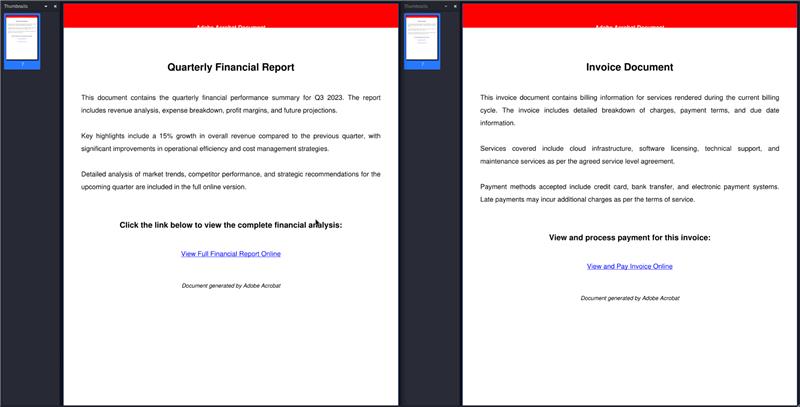
Figure 1.0 – Decoy PDFs used by the attacker
The link opened in the browser led to a compromised Brazilian business website with the Greatness phishing-as-a-service kit implant. The page impersonated a fake OneDrive secure folder requiring an access code.
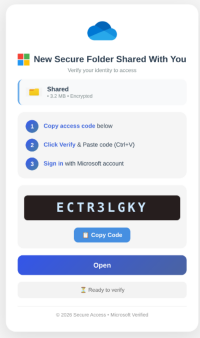
Figure 1.1 – A phishing template customized for Microsoft Office 365
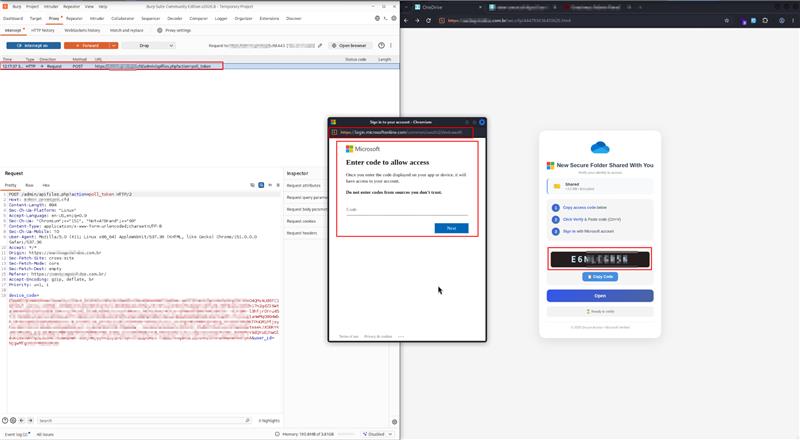
The page’s script calls the attacker’s C2, and C2 requests a real device code from Microsoft. The victim clicks on Copy Code and Open and is taken to a legitimate Microsoft device login pop-up where the victim pastes the code and is prompted with a genuine Microsoft prompt saying “Are you trying to sign in to…?” asking for the victim’s approval for the sign-in request. Once the victim approves, he is taken to an error page.
In the background, the browser polls C2 every 5s, and C2 polls Microsoft’s token endpoint. The access and refresh tokens are taken to the attacker’s session.
Once the attacker has the access and refresh tokens issued to the broker client, they can use them to register a rogue device in Entra ID and request a PRT Primary Refresh Token that gives them long-term, silent access to the victim’s accounts and apps.
With that access, the attacker can read the victim’s mailbox, steal data by impersonating the victim, and create a persistence mechanism by keeping the rogue device registered, all without needing to steal any password.
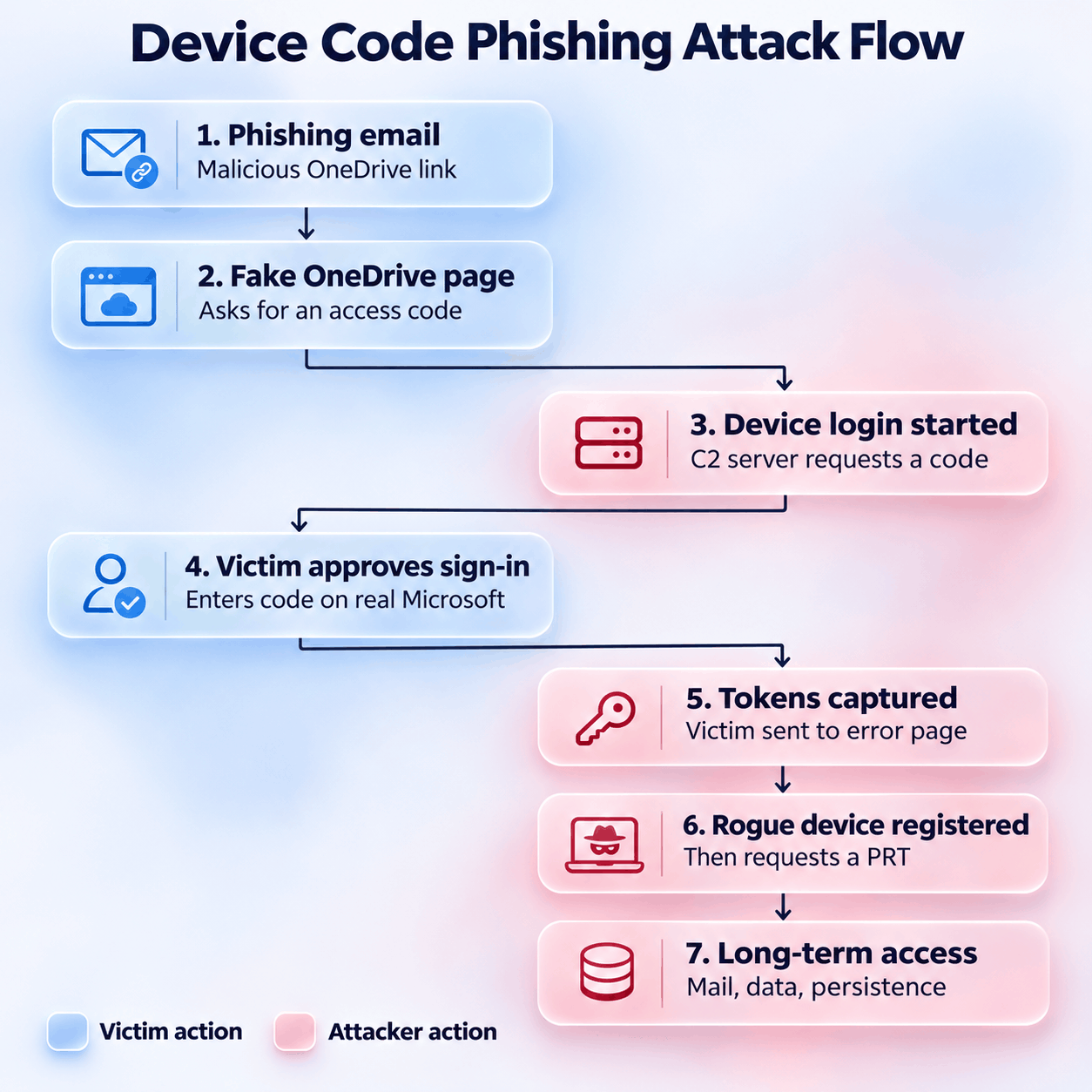
Figure 1.3 Attack chain involving Greatness Phishing-as-a-service
About the Greatness Phishing-as-a-service kit
SharkStriker’s threat researchers found evidence that the kit used by the attacker matches the description of an adversary-in-the-middle phishing kit for Microsoft 365, first reported in 2023 and in use since mid-2022.
In August 2026, ZeroBEC reported about a device-code phishing and OAuth-consent abuse kit with the same operator panel, sold on Telegram for $340 a month with a one-day trial and many operators sharing one backend. It used the same panel titled “Greatness Admin Panel,” offering an “O365 Panel” login with User ID and License fields, the apifiles.php backend, and per-operator IDs.
By using offensive techniques, SharkStriker threat research team broke into the attacker’s admin panel named “O365 Panel Sign In” and acquired their User ID and License through Telegram.
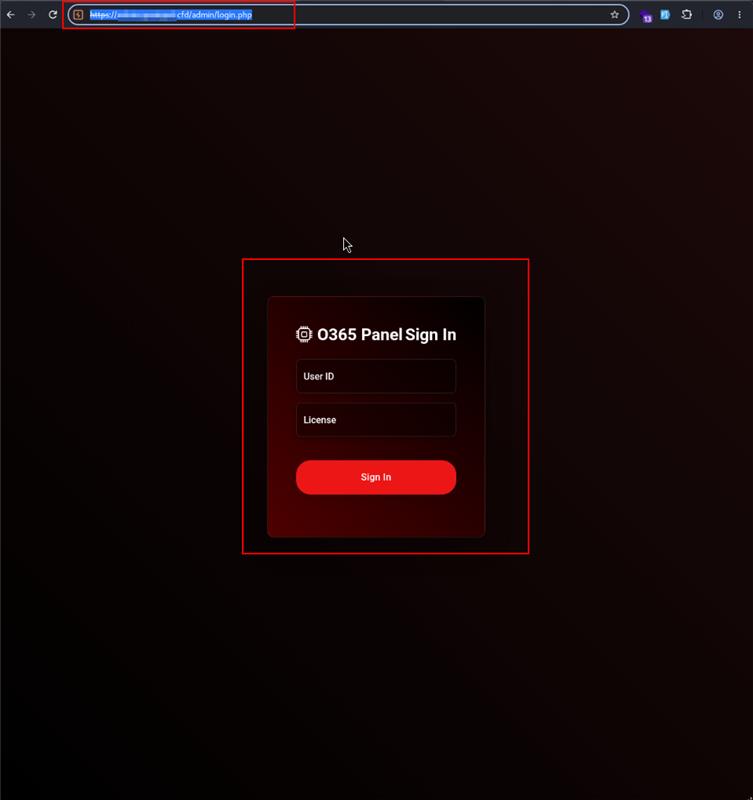
Figure 2.0 – The Greatness admin panel
Their admin panel comprised daily targets, compromised domains with pre-loaded kits, and everything needed for an attacker to easily automate mass phishing campaign including 32+ phishing templates that can be used. The User ID and License
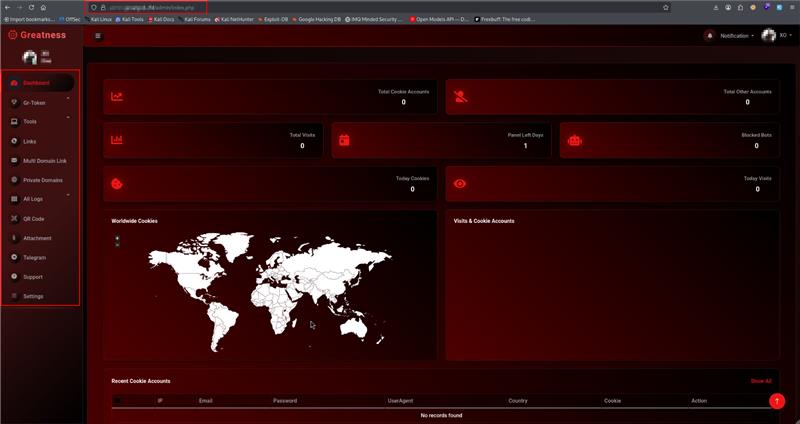
Figure 2.1 – Dashboard
They found that over 45000+ accounts were targeted with all email addresses of individuals in government and corporate organizations. All the currently active phishing pages and ongoing campaigns along with the templates used by the attacker were also uncovered by SharkStriker’s threat research team.
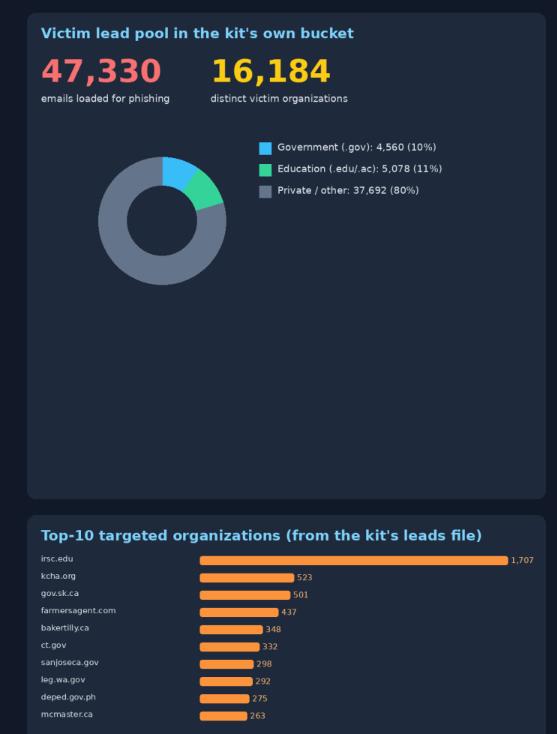
Figure 2.3 Telegram channel bot-based overview
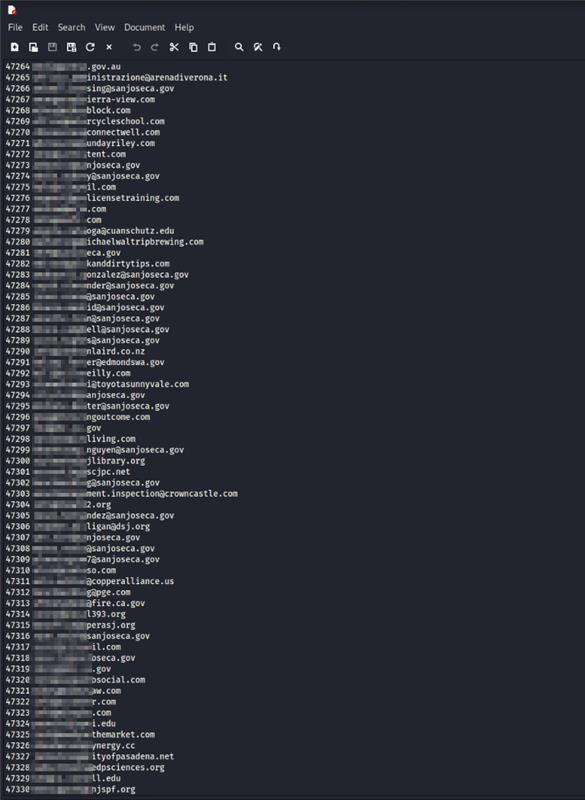
Figure 2.4 – Targeted email addresses
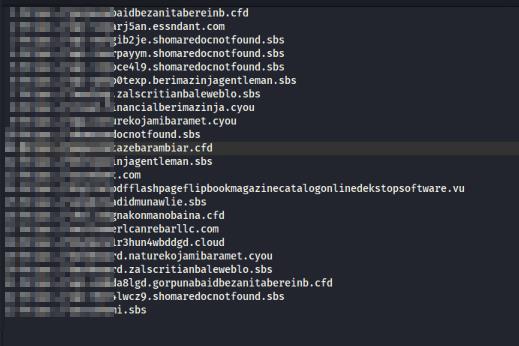
Figure 2.5 – Active phishing campaigns
About the threat actor
- Threat actor – Unknown. Telegram username – PrincessAmira
- Kit name – Greatness Phishing-as-a-service kit
- Targeted websites – Mostly Brazilian business websites with low security hygiene
- Known for – Selling customized, fully automated phishing infrastructure tailored for M365, iCloud, AIO, Gmail, and Yahoo, with domains on a subscription basis, charged based on the affiliate’s needs.
The threat actor also offers compromised domains with phishing kits uploaded to its subscribers on a regular basis.
Figure 2.6 – Threat actor’s identity
How the Greatness Phishing-as-a-service kit works?
The lure is a static 39,474-byte HTML file with inline script and CSS. It holds no code of its own: every page load asks the attacker’s server for a fresh device code, and that server asks Microsoft.
Code request – On load, the script calls GET. The C2 starts a real device authorization grant and returns device_code, user_code, verification_uri (https://login.microsoft.com/device), interval 5, and expires_in 900. The response allows any origin (CORS *), so one C2 can serve lure pages on any host.
Hand-off – The page shows user_code as an “access code”. Copy Code puts it on the clipboard and opens microsoft.com/devicelogin in a 500×650 pop-up.
Polling – Every 5 seconds, the page posts action=poll_token with the device code and operator ID. The C2 relays each poll to Microsoft’s token endpoint and answers pending, slow_down or success.
Approval – The victim enters the code on Microsoft’s page and confirms the app (“Are you trying to sign in to…?”, logged as error 50199). A browser that already holds a session for the account approves through single sign-on, with no password typed; otherwise the victim signs in and completes MFA.
Tokens – Microsoft issues access and refresh tokens to whichever client requested the code. On 29 October that client was Microsoft Authentication Broker, requesting Intune Enrollment.
Second branch – After success the page shows “Verified! Redirecting…” and 1.5 seconds later sends the browser to an authorization request for the attacker’s own Entra application (Section 6).
Failure handling. If the code request fails the page shows “Failed to get code” or “Connection error”, then an “Access Session Expired” card whose Refresh Page button starts again with a new code. A fail-safe timer meant to be 600,000 ms is set to 600,000,000 ms (about 6.9 days), so an open tab keeps polling the C2 for days.
SharkStriker’s threat research team identified that the attacker had hijacked six business websites for the campaign using the same C2 and phishing kit through them.
How to prevent Greatness phishing-kit like attacks?
- Disable or restrict Microsoft Entra ID device-code authentication wherever it is not operationally required.
- Enforce phishing-resistant MFA using FIDO2 security keys or passkeys, supported by Conditional Access policies where licensing permits.
- Monitor Entra ID sign-in and audit logs for suspicious device-code authentication, unauthorized OAuth consent grants, unusual session activity, and unauthorized device registrations.
- Strengthen email security controls to detect and block phishing attempts, malicious URLs, and emails impersonating Microsoft 365, OneDrive, and SharePoint.
- Conduct regular employee awareness training to prevent users from entering unexpected device codes or approving unfamiliar authentication requests.
- Validate suspicious URLs, domains, and file hashes using VirusTotal and other threat intelligence sources to identify potentially malicious indicators.